
The ranking
A pen scanner turns any printed line into digital text, spoken audio, or a translation the second you drag it across the page — no app to open, no photo to crop, no typing. The category splits into two real types: standalone pens that work with zero other devices, and connected pens that pair with a phone, tablet, or computer to type directly into whatever app you have open. The "best" one depends entirely on which of those two jobs you actually need done.
This ranking weighs three things that matter in practice: scan accuracy on real printed text (not just clean sans-serif fonts), how fast you can move the pen without dropping characters, and price against what each model actually includes.
| Rank | Model | Type | Price | Best for |
|---|---|---|---|---|
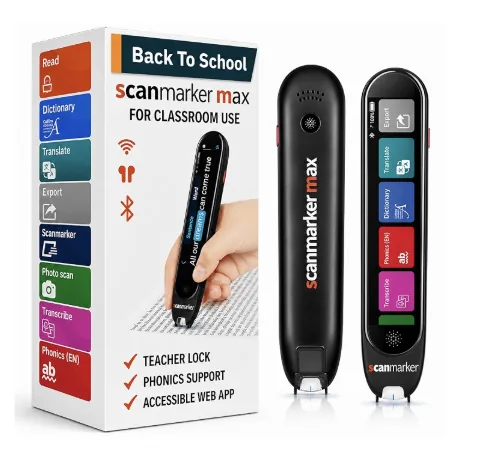
| 1 | Scanmarker Max | Standalone | $299 | Best all-around — reads aloud, translates, works offline in 30 languages, no phone needed |
| 2 | Scanmarker Air | Connected | $169 | Best for typing scanned text straight into Word, Excel, or Docs |
| 3 | Scanmarker Max Bundle | Standalone | $319 | Max plus phonics flash cards — the pick for IEP/504 and structured literacy support |
| 4 | Scanmarker Pro | Connected | $249 | Best for 1:1 device classrooms already issuing a laptop or tablet per student |
| 5 | Scanmarker PAL | Standalone | $179 | Simpler standalone option, 10 offline languages, no translation module |
| 6 | Scanmarker USB | Connected | $79 | Budget pick for a shared or locked-down computer |
- Model
- Scanmarker Max
- Type
- Standalone
- Price
- $299
- Best for
- Best all-around — reads aloud, translates, works offline in 30 languages, no phone needed
- Model
- Scanmarker Air
- Type
- Connected
- Price
- $169
- Best for
- Best for typing scanned text straight into Word, Excel, or Docs
- Model
- Scanmarker Max Bundle
- Type
- Standalone
- Price
- $319
- Best for
- Max plus phonics flash cards — the pick for IEP/504 and structured literacy support
- Model
- Scanmarker Pro
- Type
- Connected
- Price
- $249
- Best for
- Best for 1:1 device classrooms already issuing a laptop or tablet per student
- Model
- Scanmarker PAL
- Type
- Standalone
- Price
- $179
- Best for
- Simpler standalone option, 10 offline languages, no translation module
- Model
- Scanmarker USB
- Type
- Connected
- Price
- $79
- Best for
- Budget pick for a shared or locked-down computer
What actually separates them
Standalone vs. connected is the real decision, not brand vs. brand. A standalone pen (Max, Max Bundle, PAL) has its own speaker and battery — it works on a park bench, in a car, or at a kitchen table with no Wi-Fi. A connected pen (Air, Pro, USB) has no speaker of its own; it types what it scans directly into whatever app is focused on the paired device. Neither is "better" — they solve different problems, and most of the actual buying mistakes come from someone choosing a connected pen and expecting it to read aloud on its own, or a standalone pen and expecting it to type into Google Docs. Our pen scanner vs. phone comparison covers a related version of this same tradeoff.
Speed and accuracy are close across the standalone lineup. Max and PAL share the same core scanning engine; the real-world difference is in the extras layered on top, not raw OCR quality. Where accuracy actually varies is font and print quality — glossy textbook pages and unusual fonts are harder for every pen on this list, not just one.
Price differences track features, not build quality. The jump from PAL ($179) to Max ($299) buys offline translation, a dictionary lookup, and a wider language set — not a "better" scanner in the base sense. The jump from USB ($79) to Air ($169) buys wireless pairing instead of a cable. Know what you're paying for before assuming the expensive one is automatically the right one. If you're still weighing whether the category is worth it at all, see are pen scanners worth it?
Who should buy which
Want it to just read text out loud, no phone, no app? Max. Supporting a child with dyslexia or an IEP/504 that specifies structured literacy tools? Max Bundle — see our assistive technology buying guide for how that fits into a broader accommodation plan. Need to digitize text straight into a document you're already typing? Air. School district issuing a device per student and wants centralized management? Pro. Want standalone read-aloud without paying for translation you won't use? PAL. Shared family or office computer, tight budget, don't need wireless? USB — and if the buyer is outfitting more than one role at once, our scanning solutions for business guide breaks that down by deployment scenario.
Common mistakes to avoid
Buying a connected pen expecting it to read aloud on its own: Air, Pro, and USB have no built-in speaker — they need a paired device with the audio. Ignoring offline coverage: if you're scanning text in a second language away from Wi-Fi, only the standalone pens' offline language packs matter, since a connected pen's translation quality depends on what app it's typing into. Assuming price equals accuracy: OCR quality is close across the range; price buys features like translation, phonics content, and wireless, not a fundamentally sharper scanner. For a deeper look at how the underlying scan technology works across models, see standalone reading pens explained.