
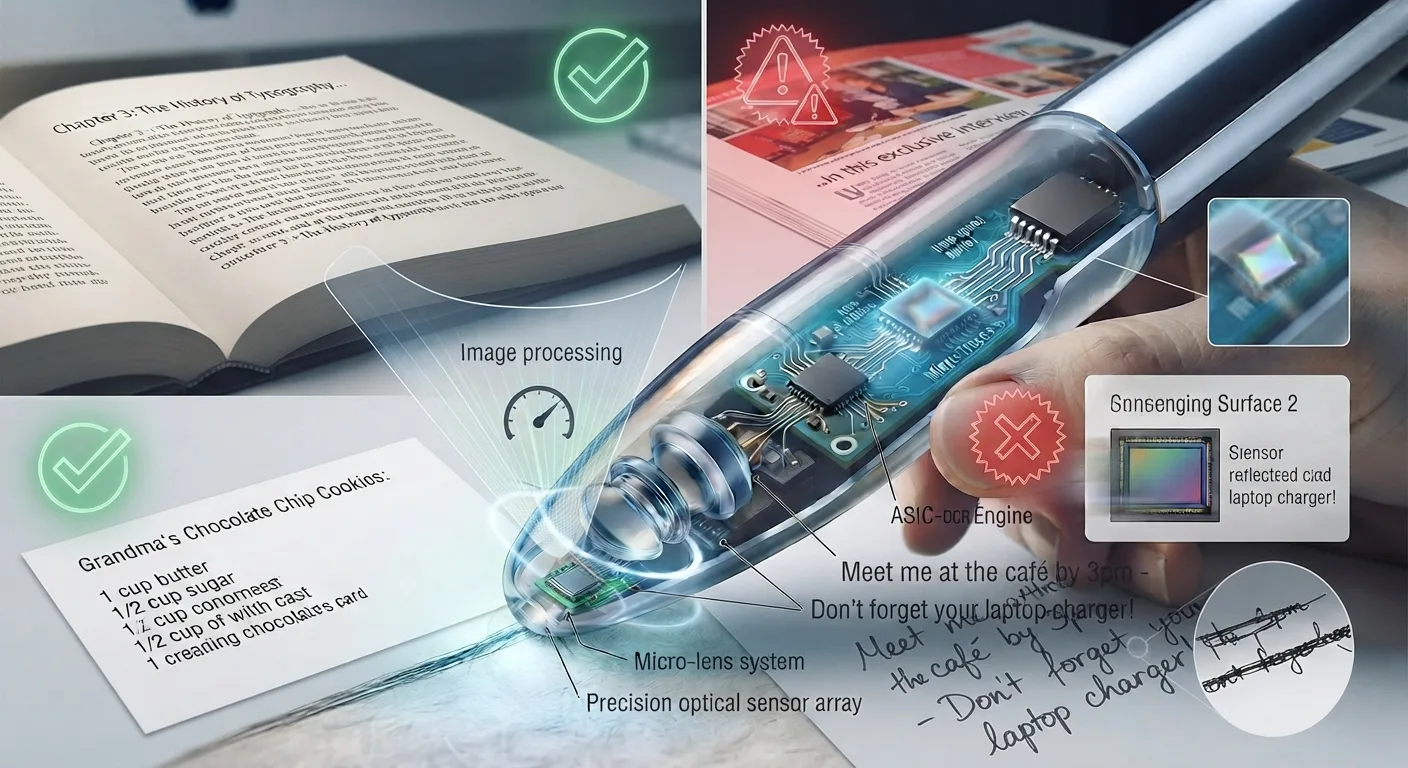
The Fundamental Compatibility Rule
Pen scanners are high-precision micro-optical instruments calibrated for a very specific real-world input: high-contrast, machine-printed typography printed on flat, non-reflective surfaces. When your source material satisfies those physical conditions, modern devices achieve character accuracy rates exceeding 99%.
However, when reading materials diverge from flat typographic paper—through handwriting, specular reflection, extreme font scales, or screen refresh cycles—accuracy drops significantly. Understanding what can and cannot be scanned helps users avoid frustration and choose the right assistive reading or document workflow.
If text is machine-printed in standard typography on flat, matte paper that you can easily read under good room lighting, a pen scanner will read it with near-flawless accuracy. If the text relies on handwriting, curved containers, glossy glare, or screen pixels, a pen scanner is the wrong tool.
Paper Stocks & Surface Texture Compatibility Matrix
Not all paper behaves identically under high-intensity LED strobe illumination. The physical coating, absorption rate, and opacity of the paper directly influence optical contrast.
| Paper Stock / Surface Material | Typical OCR Accuracy | Physical Optical Behavior | Recommended User Technique |
|---|---|---|---|
| Standard Paperback / Novel Pages | 99.2% – 99.8% | Uncoated fibrous texture absorbs LED light uniformly; perfect matte diffuse reflection. | Natural sweep velocity (10–15 cm/s); standard 75° grip angle. |
| Hardcover Academic Textbooks | 98.5% – 99.5% | High-opacity 50–70lb paper; sharp black letterforms on clean white/off-white background. | Flatten inner margin gutter with palm before sweeping near spine. |
| Printed School Worksheets & Copy Paper | 98.0% – 99.5% | Standard 20lb bond paper; highly compatible with laser and inkjet printer inks. | Place worksheet on flat hard desk; avoid scanning over desk staples. |
| Glossy Art Books & Magazines | 82.0% – 92.0% | Coated clay surface causes specular glare hotspots that blind the optical CMOS sensor. | Tilt pen slightly forward (approx. 80°) to deflect reflection away from lens. |
| Newsprint & Pulp Paperbacks | 94.0% – 97.0% | Thin paper with occasional ink bleed-through from reverse page; gray low-contrast background. | Sweep deliberately; place a dark sheet behind page if bleed-through is heavy. |
| Laminated Instruction Cards | 75.0% – 88.0% | Plastic laminate film creates intense double-reflection of LED strobes. | Angle pen perpendicular (90°) and reduce external ambient overhead glare. |
| Thermal Cash Register Receipts | 70.0% – 85.0% | Low-resolution thermal dot-matrix print; paper curls easily and heats under friction. | Hold paper taut with non-dominant hand; sweep at slow, steady pace. |
- Typical OCR Accuracy
- 99.2% – 99.8%
- Physical Optical Behavior
- Uncoated fibrous texture absorbs LED light uniformly; perfect matte diffuse reflection.
- Recommended User Technique
- Natural sweep velocity (10–15 cm/s); standard 75° grip angle.
- Typical OCR Accuracy
- 98.5% – 99.5%
- Physical Optical Behavior
- High-opacity 50–70lb paper; sharp black letterforms on clean white/off-white background.
- Recommended User Technique
- Flatten inner margin gutter with palm before sweeping near spine.
- Typical OCR Accuracy
- 98.0% – 99.5%
- Physical Optical Behavior
- Standard 20lb bond paper; highly compatible with laser and inkjet printer inks.
- Recommended User Technique
- Place worksheet on flat hard desk; avoid scanning over desk staples.
- Typical OCR Accuracy
- 82.0% – 92.0%
- Physical Optical Behavior
- Coated clay surface causes specular glare hotspots that blind the optical CMOS sensor.
- Recommended User Technique
- Tilt pen slightly forward (approx. 80°) to deflect reflection away from lens.
- Typical OCR Accuracy
- 94.0% – 97.0%
- Physical Optical Behavior
- Thin paper with occasional ink bleed-through from reverse page; gray low-contrast background.
- Recommended User Technique
- Sweep deliberately; place a dark sheet behind page if bleed-through is heavy.
- Typical OCR Accuracy
- 75.0% – 88.0%
- Physical Optical Behavior
- Plastic laminate film creates intense double-reflection of LED strobes.
- Recommended User Technique
- Angle pen perpendicular (90°) and reduce external ambient overhead glare.
- Typical OCR Accuracy
- 70.0% – 85.0%
- Physical Optical Behavior
- Low-resolution thermal dot-matrix print; paper curls easily and heats under friction.
- Recommended User Technique
- Hold paper taut with non-dominant hand; sweep at slow, steady pace.
Typography: Supported Font Sizes and Typefaces
Pen scanners are optically tuned to standard reading typography found in literature, academic textbooks, business contracts, and school curriculum materials.
Font Size Recognition (6 pt to 24 pt):
• Standard Reading Range (9 pt – 14 pt): This is the optical sweet spot. Novel prose, textbook body copy, and exam questions are recognized with maximum speed and zero character distortion.
• Small Print & Footnotes (6 pt – 8 pt): Supported on premium models with high-resolution CMOS sensors (e.g., Scanmarker Max, C-Pen Reader 2). Users should sweep slightly slower to allow the optical engine sufficient pixel density per glyph.
• Large Print & Chapter Headers (18 pt – 24 pt): The upper boundary is governed by the physical height of the guide aperture (typically 8mm). Headings larger than 24pt will be vertically truncated, cutting off ascenders or descenders.
Compatible Typeface Categories:
• Serif Fonts (Times New Roman, Georgia, Minion, Garamond, Palatino): Fully supported. Neural OCR models readily recognize serif footers, brackets, and terminal ear details.
• Sans-Serif Fonts (Arial, Helvetica, Calibri, Roboto, Inter, Verdana): Flawless recognition. Clean geometric stems and uniform stroke weights provide ideal optical boundaries.
• Specialized Dyslexia Typefaces (Lexend, OpenDyslexic): Fully compatible. Weighted baselines and asymmetrical glyph openings scan with identical precision to standard book fonts.
• Monospaced Code Fonts (Courier New, Consolas, Monaco): Highly accurate. Distinct character widths make whitespace segmentation straightforward.
• Incompatible Fonts: Ornate Gothic blackletter, ultra-condensed script, stylized handwriting fonts, and distressed grunge typography will produce garbled output.
Language Scripts: Latin, Non-Latin & Multilingual Text
Modern optical pen scanners support a broad array of international languages, but script compatibility depends on the active firmware architecture:
• Latin Alphabet Languages (English, Spanish, French, German, Italian, Portuguese, Dutch, etc.): Supported across 100% of consumer pen scanners with offline text-to-speech and dictionary support.
• Cyrillic & Greek Alphabets: Supported natively on multilingual models (Scanmarker Max, Scanmarker Pro) across Russian, Ukrainian, Bulgarian, and Modern Greek.
• CJK Ideographic Scripts (Chinese Simplified/Traditional, Japanese Kanji/Kana, Korean Hangul): Supported on advanced multilingual standalone wands. Scanning direction must follow the text orientation (horizontal left-to-right or vertical top-to-bottom on pens with vertical orientation mode).
• Right-to-Left Scripts (Arabic, Hebrew): Requires firmware supporting bidirectional optical sweep decoding. Connected highlighters (like Scanmarker Air) handle bidirectional input when paired with host desktop software.
What Fails Completely: Hard Physical and Algorithmic Limits
To maintain realistic expectations, prospective buyers should recognize materials where handheld pen scanners are categorically ineffective:
| Unsupported Medium | Why It Fails Physically | Recommended Alternative Tool |
|---|---|---|
| Cursive & Freehand Handwriting | OCR engines require consistent typographic baselines and glyph shapes; handwriting variation exceeds embedded neural capacity. | Handwriting transcription apps, specialized AI tablet styluses, or human transcription. |
| Computer & Smartphone Screens | Digital LCD/OLED screens refresh at 60–120 Hz and have pixel sub-grids. Scanning creates severe optical moiré and flicker. | Direct digital copy-and-paste, browser extension TTS (e.g. Speechify), or screenshot OCR. |
| Inverted Light-on-Dark Text | Sensors expect dark ink strokes against light paper. White text on black background confuses binarization algorithms. | Smartphone camera OCR with auto-inversion, or desktop flatbed scanning. |
| Complex Mathematical Formulas | Pen scanners process linear Unicode prose. Superscripts, fractions, square roots, and matrices cannot be expressed in line text. | Specialized math OCR software (such as Mathpix Snip) using full-frame cameras. |
| Curved Bottles & Cans | Curvature prevents the flat guide tip from making uniform contact, defocusing the CMOS lens and distorting line geometry. | Handheld smartphone camera scanner using ambient room lighting. |
- Why It Fails Physically
- OCR engines require consistent typographic baselines and glyph shapes; handwriting variation exceeds embedded neural capacity.
- Recommended Alternative Tool
- Handwriting transcription apps, specialized AI tablet styluses, or human transcription.
- Why It Fails Physically
- Digital LCD/OLED screens refresh at 60–120 Hz and have pixel sub-grids. Scanning creates severe optical moiré and flicker.
- Recommended Alternative Tool
- Direct digital copy-and-paste, browser extension TTS (e.g. Speechify), or screenshot OCR.
- Why It Fails Physically
- Sensors expect dark ink strokes against light paper. White text on black background confuses binarization algorithms.
- Recommended Alternative Tool
- Smartphone camera OCR with auto-inversion, or desktop flatbed scanning.
- Why It Fails Physically
- Pen scanners process linear Unicode prose. Superscripts, fractions, square roots, and matrices cannot be expressed in line text.
- Recommended Alternative Tool
- Specialized math OCR software (such as Mathpix Snip) using full-frame cameras.
- Why It Fails Physically
- Curvature prevents the flat guide tip from making uniform contact, defocusing the CMOS lens and distorting line geometry.
- Recommended Alternative Tool
- Handheld smartphone camera scanner using ambient room lighting.
Layout Geometry: Columns, Tables & Margin Spacing
How text is laid out on the physical page dictates how smoothly a user can guide the pen:
• Multi-Column Textbooks & Newspapers: Completely scanable, provided the user guides the pen strictly across one column at a time. The guide aperture must not drift across the vertical white gutter into the adjacent column, or words from both columns will merge into a single jumbled sentence.
• Dense Tabular Data: Scanning across a row of a data table will capture the numbers and labels in left-to-right order, separated by spaces. However, the pen scanner treats it as a single line of text; it does not automatically format columns into a spreadsheet grid unless connected software is specifically configured for delimited input.
• Tight Inner Margins (Book Gutters): When reading thick paperbacks, the inner margin curves steeply toward the glued spine. To scan the beginning of lines on the right-hand page (or the end of lines on the left-hand page), press the opposite page flat with your palm to open the gutter angle.
Frequently Asked Questions
Answers to common practical questions regarding specific scanning materials and unusual surfaces.