
What Is a Reading Pen for Dyslexia? The Formal Definition
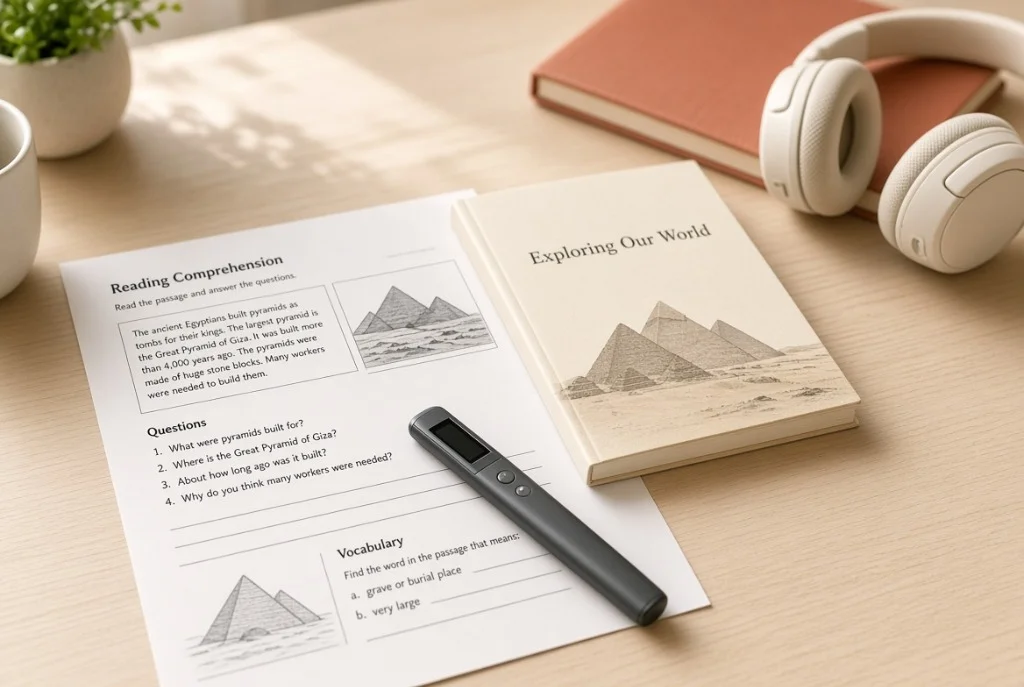
A reading pen for dyslexia is a dedicated assistive technology device engineered to provide real-time auditory decoding support for individuals with language-based learning differences. By sweeping the pen across printed text on a paper page, the user triggers an optical camera that instantly converts printed words into high-fidelity synthesized speech through an onboard speaker or private headphones.
Dyslexia is fundamentally neurobiological in origin, characterized by difficulties with accurate and fluent word recognition, poor spelling, and impaired phonological decoding. A reading pen does not "cure" or alter brain neurobiology; rather, it serves as an access bridge. By taking over the mechanical, energy-intensive task of translating visual letter combinations into phonetic sounds, the reading pen allows a student or adult to deploy their full cognitive intelligence toward comprehension, synthesis, and critical thinking.
Under disability rights frameworks such as the Individuals with Disabilities Education Act (IDEA) and Section 504 of the Rehabilitation Act, reading pens are formally recognized as Assistive Technology (AT) accommodations that enable access to the General Education Curriculum in the Least Restrictive Environment (LRE).
A reading pen for dyslexia is a handheld assistive tool that reads printed words aloud the instant you sweep it across a book or worksheet. It lifts the exhausting burden of sounding out difficult words letter by letter, letting readers with dyslexia focus on what the text actually means.
Taxonomy of Assistive Reading Pens
Assistive reading pens fall into three specific tiers based on educational environment, feature restrictions, and student age.
| Device Tier | Primary Function | Testing Legality | Top Models |
|---|---|---|---|
| Exam-Safe Pens | Pure text-to-speech with zero internal memory or dictionaries | 100% legal for ACT, SAT, GCSE & state exams | C-Pen Exam Reader 2, Scanmarker Exam |
| Comprehensive Assistive Pens | TTS + syllable breakdown, Oxford/Collins definitions & voice memos | Daily class & homework (restricted on tests) | C-Pen Reader 2, Scanmarker Max, ReaderPen |
| Bilingual Assistive Pens | Bimodal TTS + instant dual-language phonetic translation | Title III EL & bilingual programs | Scanmarker Pro, Vormor X5 Reader |
- Primary Function
- Pure text-to-speech with zero internal memory or dictionaries
- Testing Legality
- 100% legal for ACT, SAT, GCSE & state exams
- Top Models
- C-Pen Exam Reader 2, Scanmarker Exam
- Primary Function
- TTS + syllable breakdown, Oxford/Collins definitions & voice memos
- Testing Legality
- Daily class & homework (restricted on tests)
- Top Models
- C-Pen Reader 2, Scanmarker Max, ReaderPen
- Primary Function
- Bimodal TTS + instant dual-language phonetic translation
- Testing Legality
- Title III EL & bilingual programs
- Top Models
- Scanmarker Pro, Vormor X5 Reader
1. Exam-Safe Reading Pens
2. Comprehensive Assistive Pens
3. Bilingual Assistive Pens
The Problem It Solves: The "Decoding Bottleneck" and Cognitive Fatigue
In fluent readers, phonological decoding occurs automatically in a fraction of a second. When a non-dyslexic reader sees the word "photosynthesis," the brain recognizes the morphemic chunks instantaneously, leaving 95% of working memory available to understand the biological concept being explained.
For a reader with dyslexia, the neurological pathway between visual orthography (letters) and phonological assembly (sound units) is inefficient. Decoding a single multisyllabic word requires immense, conscious mental labor. By the time the reader deciphers the fourth word of a complex sentence, working memory is completely depleted—leading to what psychologists call "cognitive fatigue."
A reading pen completely dissolves this decoding bottleneck. When encountering an unfamiliar word, the student simply sweeps the pen. Hearing the word pronounced correctly through headphones in half a second bridges the gap without interrupting the narrative flow of the paragraph.
How Reading Pens Work: The Bimodal Reading Cycle
The most effective educational use of a reading pen is not passive listening, but active "bimodal reading"—a well-documented cognitive strategy where visual and auditory processing streams reinforce one another simultaneously.
Student guides optical nose along the troublesome line or isolated word on the worksheet.
The pen’s OLED screen renders the scanned sentence, highlighting each word in synchronization.
High-quality synthesized human voice speaks the words cleanly into connected earbuds.
Student eyes track the physical paper while ear confirms pronunciation, unlocking instant comprehension.
What It Is NOT: Remediation vs. Accommodation
The single most critical distinction in special education technology is understanding the difference between an instructional intervention and an assistive accommodation.
| Educational Dimension | Reading Pen (Accommodation) | Structured Literacy / Phonics (Intervention) |
|---|---|---|
| Primary Objective | Immediate access to printed information without decoding fatigue | Remediating phonological awareness, spelling, and decoding mechanics |
| Role in Learning | Leveling the playing field so a student can demonstrate subject mastery | Building neurological pathways for independent human reading over years |
| Typical Setting | Science tests, social studies worksheets, literature reading, exams | 1-on-1 reading specialist sessions, Tier 3 intervention pullouts |
| Is it "Cheating"? | No. It is the reading equivalent of eyeglasses for a student with myopia | N/A (Represents foundational academic curriculum) |
- Reading Pen (Accommodation)
- Immediate access to printed information without decoding fatigue
- Structured Literacy / Phonics (Intervention)
- Remediating phonological awareness, spelling, and decoding mechanics
- Reading Pen (Accommodation)
- Leveling the playing field so a student can demonstrate subject mastery
- Structured Literacy / Phonics (Intervention)
- Building neurological pathways for independent human reading over years
- Reading Pen (Accommodation)
- Science tests, social studies worksheets, literature reading, exams
- Structured Literacy / Phonics (Intervention)
- 1-on-1 reading specialist sessions, Tier 3 intervention pullouts
- Reading Pen (Accommodation)
- No. It is the reading equivalent of eyeglasses for a student with myopia
- Structured Literacy / Phonics (Intervention)
- N/A (Represents foundational academic curriculum)
A reading pen is an accommodation tool, NOT an instructional intervention or cure. It does not teach a child how to decode phonemes, and it does not replace structured literacy instruction (such as Orton-Gillingham). A reading pen gives access to grade-level content today, while structured literacy builds reading skills for tomorrow.
Key Assistive Capabilities of Modern Reading Pens
Assistive reading pens include specialized firmware features engineered specifically for neurodivergent learners.
| Feature | Assistive Functionality | Cognitive Benefit for Dyslexia |
|---|---|---|
| Variable Speech Rate | Adjustable audio speed from 50% (slow enunciated) to 150% (rapid) | Allows auditory processing disorders to slow down multisyllabic phonemes |
| Word-by-Word Syllable Pause | Inserts deliberate micro-pauses between syllables (e.g., "pho-to-syn-the-sis") | Aids orthographic mapping and helps readers isolate prefix/suffix structures |
| Audio Replay Buffer | Single-button tap immediately repeats the last scanned line | Reinforces working memory without requiring the user to physically re-scan |
| Left-Hand / Right-Hand Toggle | Inverts sensor direction and screen orientation in settings | Prevents optical distortion for left-handed sweepers who push rather than pull |
| Integrated Headphone Jack | Standard 3.5mm or Bluetooth audio out | Ensures private listening in quiet classrooms without calling peer attention |
- Assistive Functionality
- Adjustable audio speed from 50% (slow enunciated) to 150% (rapid)
- Cognitive Benefit for Dyslexia
- Allows auditory processing disorders to slow down multisyllabic phonemes
- Assistive Functionality
- Inserts deliberate micro-pauses between syllables (e.g., "pho-to-syn-the-sis")
- Cognitive Benefit for Dyslexia
- Aids orthographic mapping and helps readers isolate prefix/suffix structures
- Assistive Functionality
- Single-button tap immediately repeats the last scanned line
- Cognitive Benefit for Dyslexia
- Reinforces working memory without requiring the user to physically re-scan
- Assistive Functionality
- Inverts sensor direction and screen orientation in settings
- Cognitive Benefit for Dyslexia
- Prevents optical distortion for left-handed sweepers who push rather than pull
- Assistive Functionality
- Standard 3.5mm or Bluetooth audio out
- Cognitive Benefit for Dyslexia
- Ensures private listening in quiet classrooms without calling peer attention
Deep Dive: Preserving Independence and Eliminating Stigma
Beyond the raw cognitive mechanics of decoding, reading pens solve an equally devastating emotional challenge: the psychological stigma of struggling to read in front of peers.
In traditional classroom environments without assistive technology, an adolescent student with dyslexia has two agonizing choices: raise their hand and ask a teacher or paraprofessional to read the test question aloud (signaling disability to the entire classroom), or sit in silence and guess blindly on questions they understand conceptually but cannot decode visually.
A reading pen restores complete personal dignity. Because modern reading pens resemble high-end consumer voice recorders or sleek digital highlighters, students can wear unobtrusive wired earbuds and privately scan questions as needed. Clinical studies consistently document that providing an independent reading pen dramatically reduces test anxiety, eliminates behavioral avoidance tactics, and elevates test scores in science and social studies by 15% to 30%.
History of Assistive Reading Pens in Special Education
The adoption of scanning pens in special education spanned four decades of legal and technological milestones.
| Era | Developments & Milestones | Classroom Reality |
|---|---|---|
| 1. Pre-Digital (1980s – 1990s) | Human reading aides, audio cassette textbooks (Recording for the Blind & Dyslexic). | Zero independence; students completely reliant on adult scheduling and cassette availability. |
| 2. The Early Quicktionary Era (2000 – 2008) | Wizcom Quicktionary introduced; bulky green plastic devices with low-contrast LCD screens. | Prone to misreads; robotic synthetic voices sounded metallic and fatigued young listeners. |
| 3. The Legal Accommodation Breakthrough (2009 – 2018) | UK Joint Council for Qualifications (JCQ) and US testing boards formally approve C-Pen Exam Reader. | Shift from clinical curiosity to standard IEP accommodation across thousands of public school districts. |
| 4. The Natural Voice Era (2019 – Present) | High-definition neural vocal synthesizers, ultra-wide optical sensors, lightweight ergonomic casings. | Indistinguishable from modern consumer gadgets; seamless integration into daily homework and study. |
- Developments & Milestones
- Human reading aides, audio cassette textbooks (Recording for the Blind & Dyslexic).
- Classroom Reality
- Zero independence; students completely reliant on adult scheduling and cassette availability.
- Developments & Milestones
- Wizcom Quicktionary introduced; bulky green plastic devices with low-contrast LCD screens.
- Classroom Reality
- Prone to misreads; robotic synthetic voices sounded metallic and fatigued young listeners.
- Developments & Milestones
- UK Joint Council for Qualifications (JCQ) and US testing boards formally approve C-Pen Exam Reader.
- Classroom Reality
- Shift from clinical curiosity to standard IEP accommodation across thousands of public school districts.
- Developments & Milestones
- High-definition neural vocal synthesizers, ultra-wide optical sensors, lightweight ergonomic casings.
- Classroom Reality
- Indistinguishable from modern consumer gadgets; seamless integration into daily homework and study.
Known Limitations & Practical Failure Modes
While life-changing for many students, reading pens are not universally appropriate for every learner or reading situation:
- Motor Coordination Demands: Children with concurrent dyspraxia or fine-motor tremors may struggle to maintain a consistent 75-degree angle and steady swipe speed along the text line.
- Very Young Learners (K-2): Early elementary students who have not yet developed basic line-tracking awareness often lift the pen erratically off the page.
- Dense Graphic Novel & Multi-Column Layouts: Text embedded inside colorful comic bubbles or squeezed between diagrams can lead to fragmented optical capture.
- Poor Paper Contrast: Darkly colored construction paper worksheets or cheap recycled newsprint can diminish OCR accuracy.
Benefits vs. Tradeoffs of Reading Pens in Education
Schools and parents should weigh the clear educational advantages against practical classroom considerations.
Educational Advantages
- ✓Unlocks age-appropriate grade-level vocabulary and complex literature
- ✓Eliminates classroom stigma by enabling private earphone listening
- ✓Approved for standardized testing (Exam Edition models)
- ✓Reduces homework battles and parental reading fatigue at home
- ✓Empowers self-advocacy and academic independence
Practical Challenges & Considerations
- •Requires upfront orientation and hand-eye calibration practice
- •Significant upfront purchase price ($200–$280 per unit)
- •Must be charged regularly via USB; risk of student misplacement
- •Does not teach underlying phonics or spelling rules directly
- •May frustrate students with severe motor-skill impairments
Reading Pen vs. Human Reader in Exams and Classrooms
In testing accommodations, the historical gold standard was assigning a human reader (a teacher or proctor) to sit in an isolated room with the student and vocalize the test prompts.
While human readers are intuitive, they introduce major standardized test vulnerabilities: human proctors unconsciously introduce inflection clues, vary their reading speed, or cause students to feel rushed. Furthermore, scheduling one adult proctor per student places an immense staffing strain on school administrators.
An exam reading pen standardizes testing equity. Every student receives the exact same neutral, repeatable pronunciation. The student can replay a paragraph three times without apologizing, and school testing coordinators can supervise twenty accommodated students in a single room simultaneously.
When to Introduce a Reading Pen (Decision Matrix)
Use this checklist to determine whether a reading pen is the right assistive accommodation for a struggling reader.
IDEAL CANDIDATE FOR A READING PEN:
- ✓Student has strong listening comprehension but severe decoding struggles
- ✓Student regularly encounters printed paper worksheets, textbooks, or paper exams
- ✓Student has adequate fine-motor control to hold and drag a marker steadily
- ✓Student feels self-conscious asking adults or peers for reading help
- ✓School requires an offline device with zero internet access for exam security
EXPLORE ALTERNATIVE TOOLS INSTEAD IF:
- •Student has profound auditory processing disorder and struggles to comprehend spoken audio
- •All classroom reading materials are already 100% digital on Chromebooks or iPads
- •Student has severe physical tremors or spasticity (screen-based TTS is better)
- •Student is in Kindergarten or 1st grade still learning initial letter recognition
- •The student needs whole-page hands-free reading of 50-page literary novels (audiobook is superior)
For parents seeking structured at-home homework strategies and age-specific device selection, explore parent-first guides at Pen for Dyslexia and literacy intervention resources at Dyslexia Scanmarker.
The Mental Model: "Eyeglasses for the Phonological Loop"
When an ophthalmologist prescribes eyeglasses for a nearsighted child, nobody accuses the child of "cheating" or claims the glasses will make their eyes permanently lazy. Eyeglasses simply focus light onto the retina so the brain can interpret the world.
A reading pen is eyeglasses for the phonological loop. It focuses sound onto the auditory cortex so the brain can interpret ideas. It does not replace the neurological act of thinking; it simply removes an optical barrier.
Frequently Asked Questions
Practical questions answered regarding reading pens for dyslexia, IEP eligibility, and classroom rules.