
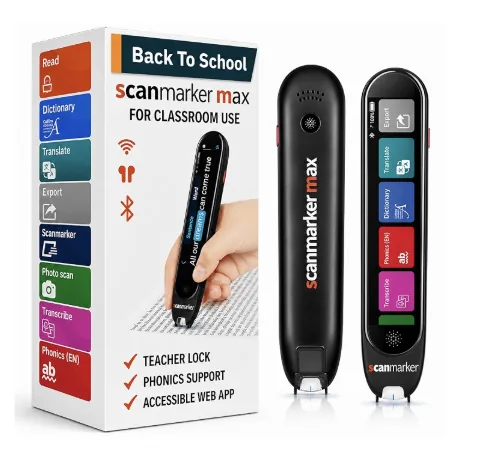
What "Standalone" Actually Means in Assistive Technology
In the assistive reading and optical scanning category, devices are divided into two distinct engineering architectures: standalone devices and connected peripherals.
A Standalone Reading Pen is a 100% self-contained mobile computing instrument. Inside its lightweight chassis sits an optical CMOS camera, an embedded ARM processor, flash memory storing complete offline language dictionaries and OCR neural models, a digital audio synthesizer, an internal speaker, a headphone jack, a rechargeable lithium battery, and (on most models) an OLED or color touchscreen display.
When you swipe a standalone pen across a printed line, the entire computational cycle—from image capture to character recognition, dictionary lookup, and text-to-speech vocalization—happens entirely within the pen itself. Nothing is transmitted to a smartphone, nothing requires an internet connection, and no third-party apps are needed.
By contrast, a Connected Pen (such as a tethered USB or wireless Bluetooth digital highlighter) is merely an optical input peripheral. It captures raw scan frames and transmits them to a paired computer, tablet, or phone, relying entirely on the host device’s processor, screen, and battery to perform recognition and display results.
A standalone reading pen is an independent assistive reading computer inside an ergonomic wand. It reads printed books aloud through its own built-in speaker the moment you touch paper—requiring zero smartphones, apps, Bluetooth pairing, or Wi-Fi networks.
The Cognitive Value of Phone-Free Reading Independence
For students with dyslexia, struggling readers, or adults tackling dense professional contracts, the primary value of a standalone pen is cognitive, not technical.
1. Eradication of the Digital Friction Barrier:
When a reader with dyslexia encounters an unfamiliar word using a smartphone app, they must unlock their phone, dismiss push notifications, open a camera app, align the page, tap the capture button, crop the sentence, and wait for processing. By the time audio plays, their cognitive working memory has completely lost the narrative thread of the book.
With a standalone pen resting beside the book, the reader simply sweeps the word. Audio plays in under half a second. The reader never lifts their eyes from the physical page, preserving reading momentum and comprehension.
2. Protection from Smartphone Distraction and Homework Fatigue:
Smartphones are engineered for engagement, dopamine feedback loops, and continuous connectivity. Handing a smartphone to an elementary or middle school student with ADHD or dyslexia during homework creates an immediate battle with YouTube, TikTok, and text messages. A standalone pen is a dedicated, single-purpose reading instrument with zero browsing capability.
3. Psychological Autonomy and Dignity:
Students who require reading support frequently express embarrassment when an adult tutor or paraprofessional sits beside them reading worksheets aloud. A standalone pen paired with discreet wired or wireless earbuds restores complete privacy: the student reads independently at their own pace without feeling singled out.
Standalone vs. Connected Hardware Architecture Compared
Before purchasing, buyers must evaluate how the physical architecture aligns with their daily reading environment.
| Architectural Feature | Standalone Reading Pens (Max, C-Pen Reader 2) | Connected Digital Highlighters (Air, USB) |
|---|---|---|
| Host Device Requirement | None (100% self-contained unit) | Requires paired PC, Mac, Chromebook, or mobile phone |
| Audio Output Mechanism | Built-in 0.5W speaker + 3.5mm/Bluetooth audio jack | Plays through host computer or phone speakers/headphones |
| Visual Display | Integrated OLED / Color LCD Touchscreen | None (displayed on host computer monitor or phone screen) |
| Internet / Cloud Dependency | Zero (offline neural models & lexical dictionaries) | Varies (some models require cloud OCR or companion apps) |
| Classroom / Exam Suitability | High (meets school no-phone rules & exam accommodation bans) | Low in testing (prohibited due to phone/laptop connectivity) |
| Primary Practical Application | Independent book reading, dyslexia support, homework, exams | Rapid document transcription, book quotes into Word/Google Docs |
| Price Range | $179 to $399 USD | $79 to $249 USD |
- Standalone Reading Pens (Max, C-Pen Reader 2)
- None (100% self-contained unit)
- Connected Digital Highlighters (Air, USB)
- Requires paired PC, Mac, Chromebook, or mobile phone
- Standalone Reading Pens (Max, C-Pen Reader 2)
- Built-in 0.5W speaker + 3.5mm/Bluetooth audio jack
- Connected Digital Highlighters (Air, USB)
- Plays through host computer or phone speakers/headphones
- Standalone Reading Pens (Max, C-Pen Reader 2)
- Integrated OLED / Color LCD Touchscreen
- Connected Digital Highlighters (Air, USB)
- None (displayed on host computer monitor or phone screen)
- Standalone Reading Pens (Max, C-Pen Reader 2)
- Zero (offline neural models & lexical dictionaries)
- Connected Digital Highlighters (Air, USB)
- Varies (some models require cloud OCR or companion apps)
- Standalone Reading Pens (Max, C-Pen Reader 2)
- High (meets school no-phone rules & exam accommodation bans)
- Connected Digital Highlighters (Air, USB)
- Low in testing (prohibited due to phone/laptop connectivity)
- Standalone Reading Pens (Max, C-Pen Reader 2)
- Independent book reading, dyslexia support, homework, exams
- Connected Digital Highlighters (Air, USB)
- Rapid document transcription, book quotes into Word/Google Docs
- Standalone Reading Pens (Max, C-Pen Reader 2)
- $179 to $399 USD
- Connected Digital Highlighters (Air, USB)
- $79 to $249 USD
Standardized Testing & Exam-Lock Accommodation Compliance
One of the most critical applications for standalone reading pens is standardized academic testing, including ACT, SAT, AP exams, state assessments, and UK JCQ (Joint Council for Qualifications) testing.
Under testing regulations, students with documented reading disabilities (via IEP or 504 accommodation plans) are permitted text-to-speech accommodations. However, standard smartphones, tablets, or internet-connected laptops are strictly prohibited inside examination halls due to cheating risks.
How Exam-Lock Security Functions:
• Dedicated Exam Editions (such as C-Pen Exam Reader 2): These devices ship from the factory with language translation, dictionary lookup, and digital text storage permanently disabled at the firmware level. Only line-level text-to-speech read-aloud remains functional.
• Software Exam Modes (such as Scanmarker Max Exam-Lock): Allow educators or test proctors to engage a password-protected exam mode before testing begins, locking out definition dictionaries and translation until the assessment concludes.
Because these pens contain zero Wi-Fi, zero cameras pointing into the room, and zero memory storage in exam mode, testing coordinators can verify compliance in seconds.
Top Standalone Reading Pens on the Market
Four models currently dominate the standalone reading category, each engineered for distinct user demographics:
| Hardware Model | Price (USD) | Display & Interface | Offline Languages | Target Demographics & Best For |
|---|---|---|---|---|
| Scanmarker Max | $299 | Color Touchscreen | 30 offline TTS languages | Dyslexia students and bilingual learners needing multi-language offline TTS and exam-lock. |
| C-Pen Reader 2 | $399 | OLED Screen / Physical Buttons | English, Spanish, French | Special Education standard with built-in Collins and Oxford definitions. |
| Scanmarker PAL | $179 | Screenless / Simple Tactile Buttons | English | Early readers (K-5) needing durable, distraction-free audio read-aloud at a budget price. |
| C-Pen Exam Reader 2 | $399 | OLED Screen / Physical Buttons | English, Spanish, French | Official standardized testing environments requiring permanent dictionary lockouts. |
- Price (USD)
- $299
- Display & Interface
- Color Touchscreen
- Offline Languages
- 30 offline TTS languages
- Target Demographics & Best For
- Dyslexia students and bilingual learners needing multi-language offline TTS and exam-lock.
- Price (USD)
- $399
- Display & Interface
- OLED Screen / Physical Buttons
- Offline Languages
- English, Spanish, French
- Target Demographics & Best For
- Special Education standard with built-in Collins and Oxford definitions.
- Price (USD)
- $179
- Display & Interface
- Screenless / Simple Tactile Buttons
- Offline Languages
- English
- Target Demographics & Best For
- Early readers (K-5) needing durable, distraction-free audio read-aloud at a budget price.
- Price (USD)
- $399
- Display & Interface
- OLED Screen / Physical Buttons
- Offline Languages
- English, Spanish, French
- Target Demographics & Best For
- Official standardized testing environments requiring permanent dictionary lockouts.
Buyer’s Checklist: How to Avoid Fake "Standalone" Marketing
When shopping online, buyers frequently encounter cheap handheld wands marketed as "reading pens" that turn out to be tethered peripherals. Before purchasing, verify this five-point checklist:
1. Built-in Speaker: Does the pen have an integrated speaker grille on the body? If it requires pairing with your phone to hear sound, it is not standalone.
2. Onboard Audio Jack: Look for a 3.5mm headphone jack or direct Bluetooth headphone pairing capability for classroom and library use.
3. Offline Dictionary Storage: Confirm that lexical definitions and OCR engines reside in internal flash storage, not requiring a Wi-Fi connection.
4. Rechargeable USB-C Battery: Quality standalone pens provide 6 to 10 hours of active continuous scanning per charge.
5. Left-Handed vs. Right-Handed Mode: Ensure the device menu allows switching scanning direction so left-handed readers do not read upside-down text.
Frequently Asked Questions
Answers to common practical questions regarding standalone reading pen operation and maintenance.