
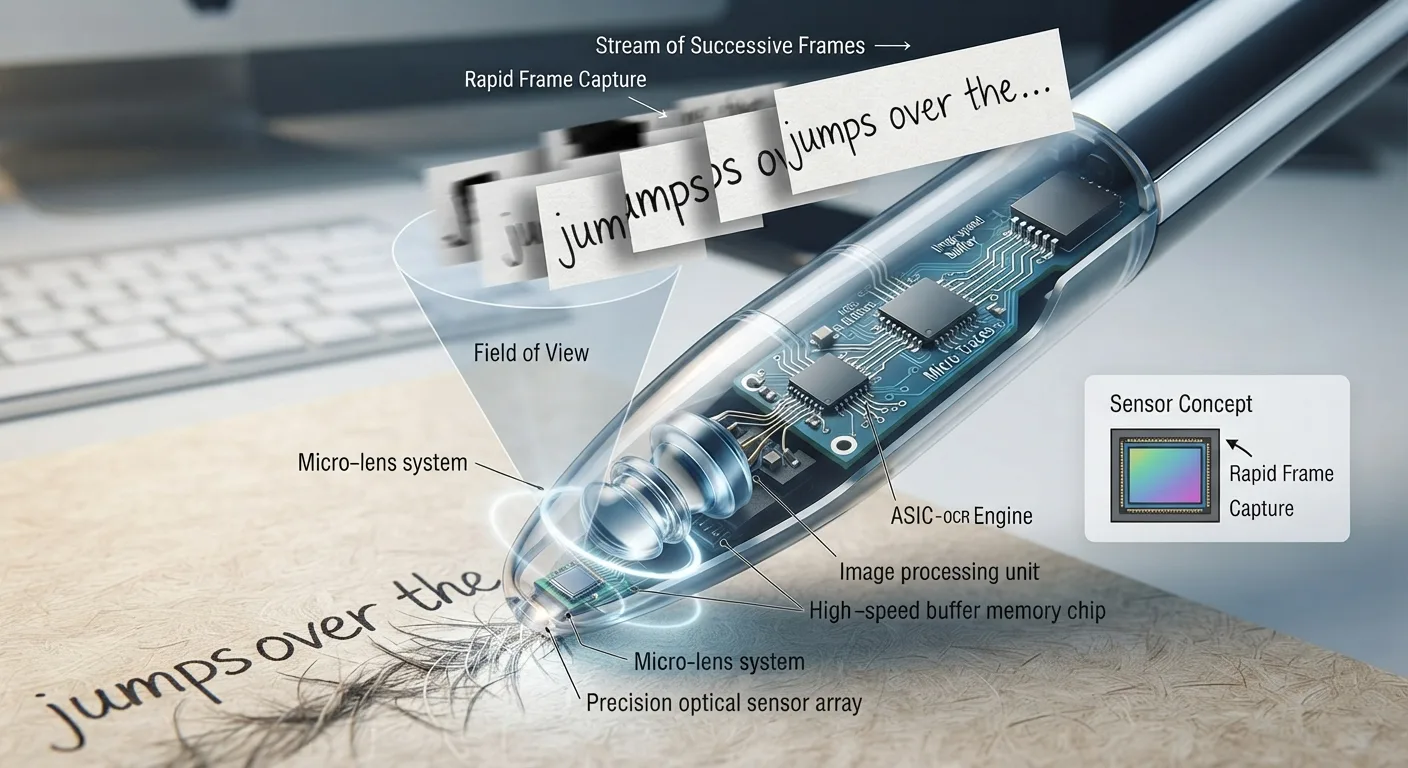
The Big Idea: Teaching Computers How to Read
When your eyes look at a word on a page, your brain performs magic without you even noticing. You instantly recognize the shapes of the letters, string them into words, hear their sounds in your head, and understand their meaning.
A computer cannot do that on its own. If you point a camera at an open book, the computer does not see "words" or "ideas"—it only sees a giant grid of colored dots (pixels), no different from a snapshot of a sunset or a plate of pasta. It has no clue that a circle with a tail is a "Q" or that a space between letters means a word has ended.
Optical Character Recognition (OCR) is the bridge between the physical world of paper and the digital world of computers. It is the clever computer vision technology that inspects that grid of dots, identifies individual letterforms, and turns them into live, searchable, editable digital text.
OCR (Optical Character Recognition) is software that turns pictures of printed text into actual digital words. It transforms a flat, unsearchable photo of a book into live text you can edit, search, copy into Google Docs, or have read aloud through headphones.
How OCR Reads a Page in 4 Simple Steps
Whether OCR is running on a massive supercomputer digitizing library archives or inside a tiny 70-gram pen scanner sweeping across a worksheet, it always follows four fundamental steps:
| Stage | What the Computer Does | Why It Matters in Everyday Reading |
|---|---|---|
| Step 1: Capture | Takes a close-range photo with a sensor at 60 to 120 frames per second. | Ensures character strokes are sharp and sharp even if your hand sweeps quickly. |
| Step 2: Binarize | Converts colored/gray paper into absolute black ink on pure white background. | Ignores yellow highlighter marks, paper texture, and ambient room shadows. |
| Step 3: Segment & Classify | Isolates each letter and measures its visual anatomy (loops, angles, dots). | Recognizes that a circle with a crossbar on top is a "b", while a circle with a tail is a "p". |
| Step 4: Lexical Polish | Passes candidate letters through statistical language dictionaries. | Catches and fixes ambiguous letters using the words before and after it. |
- What the Computer Does
- Takes a close-range photo with a sensor at 60 to 120 frames per second.
- Why It Matters in Everyday Reading
- Ensures character strokes are sharp and sharp even if your hand sweeps quickly.
- What the Computer Does
- Converts colored/gray paper into absolute black ink on pure white background.
- Why It Matters in Everyday Reading
- Ignores yellow highlighter marks, paper texture, and ambient room shadows.
- What the Computer Does
- Isolates each letter and measures its visual anatomy (loops, angles, dots).
- Why It Matters in Everyday Reading
- Recognizes that a circle with a crossbar on top is a "b", while a circle with a tail is a "p".
- What the Computer Does
- Passes candidate letters through statistical language dictionaries.
- Why It Matters in Everyday Reading
- Catches and fixes ambiguous letters using the words before and after it.
A camera or optical sensor takes a high-speed photo of the text under bright LED light.
The software removes paper shadows, stains, and wrinkles, turning the image into crisp black-and-white.
A neural network measures loops, stems, crossbars, and curves to identify each letter.
An internal spellchecker verifies the word makes sense in context, fixing tricky typos.
Why Tricky Letters Confuse Computers (The "Optical Twins")
Have you ever mistaken someone’s handwriting or squinted at a tiny font? Computers face the exact same challenge. In typography, several different letters and numbers look almost completely identical to a camera sensor.
Engineers call these "optical twins." Here is how smart OCR engines tell them apart:
The Common Optical Traps
- •The Vertical Line Trap: Lowercase
l, capitalI, number1, and the vertical bar|. - •The Oval Ambiguity: Capital letter
Oversus number0. - •The Merged Letters Trap: An
rfollowed byn(rn) easily looks like anm. - •The Close Kerning Trap: A
ctouching anl(cl) can look like ad.
How Smart OCR Fixes Them
- ✓Dictionary Validation: If the pen scans "buming wood", the dictionary knows "buming" is not a word and fixes it to "burning".
- ✓Grammar & Context: In the sentence "I have 1 apple", the computer knows letters belong in "I" and numbers belong in "1".
- ✓Baseline Measurement: Numbers sit slightly differently on the typographic line compared to uppercase and lowercase letters.
- ✓Neural Confidence Scores: If a letter is 51% an "l" and 49% an "I", context breaks the tie automatically.
OCR vs. Text-to-Speech: The Tag-Team Metaphor
Because reading pens can scan text and immediately speak it aloud through a speaker, many people think "OCR" and "Text-to-Speech" are the same thing.
They are actually two completely separate technologies that work together like a tag-team:
• OCR is the Eyes: It looks at the physical ink on the paper and turns it into digital letters. But OCR has no voice, makes no sound, and does not understand how words are pronounced.
• Text-to-Speech (TTS) is the Voice: It takes digital letters, figures out the phonetics, and speaks them out loud with a natural voice. But TTS has no eyes—it cannot read a physical paper book on its own.
When you use an assistive reading pen (like the Scanmarker Max or C-Pen Reader 2), the pen’s camera and OCR act as your eyes, while the onboard TTS engine acts as your voice. That tag-team is what lets a struggling reader listen to any printed page in under half a second.
OCR looks at the ink and types the letters. Text-to-Speech (TTS) reads the letters and speaks the words. A reading pen combines both inside a single handheld wand.
Where Does OCR Live? Reading Pens vs. Phones vs. Cloud
Today, OCR software runs in three completely different environments. Understanding where your OCR is running explains why some tools feel lightning-fast while others lag:
| Tool Type | Where OCR Runs | Internet Needed? | Best Use Case |
|---|---|---|---|
| Handheld Reading Pens (Scanmarker Max, C-Pen) | Inside the pen on an embedded ARM chip (Edge OCR) | No (100% offline) | Reading lines in books, school worksheets, independent homework, and exam halls. |
| Smartphone Camera Apps (Apple Live Text, Google Lens) | On your phone processor and neural engine | Usually no, but can use cloud | Snapping whole-page documents, signs, menus, receipts, and product labels. |
| Desktop & Cloud Services (Google Drive, Adobe Acrobat) | On remote internet server clusters (Cloud OCR) | Yes (requires internet) | Digitizing huge 300-page scanned PDF books, archives, and complex office paperwork. |
- Where OCR Runs
- Inside the pen on an embedded ARM chip (Edge OCR)
- Internet Needed?
- No (100% offline)
- Best Use Case
- Reading lines in books, school worksheets, independent homework, and exam halls.
- Where OCR Runs
- On your phone processor and neural engine
- Internet Needed?
- Usually no, but can use cloud
- Best Use Case
- Snapping whole-page documents, signs, menus, receipts, and product labels.
- Where OCR Runs
- On remote internet server clusters (Cloud OCR)
- Internet Needed?
- Yes (requires internet)
- Best Use Case
- Digitizing huge 300-page scanned PDF books, archives, and complex office paperwork.
5 Simple Rules for Getting 99%+ Accuracy
If you use a pen scanner or phone OCR app, you can avoid almost all mistakes by following five simple physical habits:
Frequently Asked Questions
Real, everyday questions about how OCR technology works in the real world.