
Why decoding is the bottleneck
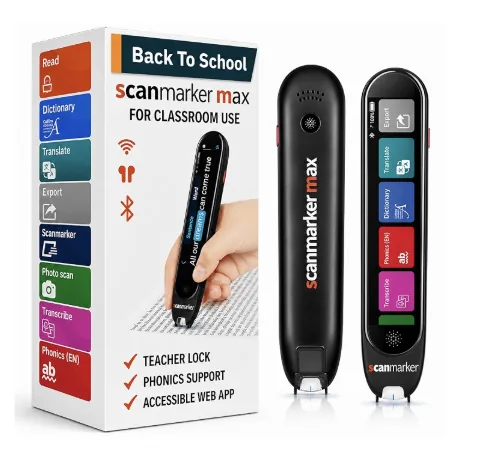
Dyslexia is common enough that most classrooms include a student affected by it. For many, the struggle is not with intelligence or comprehension — it is with decoding. The time and mental energy required to decode individual words leaves nothing for understanding the broader text. Scanmarker Max was designed to remove that decoding bottleneck so that students can engage with grade-level content on equal footing.
1. The phonics module builds decoding alongside reading
Most read-aloud tools skip over the word and just say it. Scanmarker Max's phonics module does something different: it breaks each scanned word into its syllables and phoneme-grapheme correspondences, displaying the breakdown on screen alongside the audio pronunciation.
This matters because structured literacy research is unambiguous — students with dyslexia need explicit, systematic phonics instruction. Hearing words spoken aloud without that analysis does not build decoding skill — it just bypasses it. The pen becomes both an accommodation and an instructional tool in the same device.
2. Exam-lock mode makes Scanmarker Max test-approved
One of the most common barriers for students with IEP or 504 accommodations involving assistive technology is what is allowed in the exam room. Smartphones and internet-connected tablets are almost universally prohibited during standardized assessments.
Scanmarker Max solves this with exam-lock mode. Activating exam-lock disables all internet connectivity, translation features, and web app sync. The device becomes a self-contained read-aloud tool — exactly what accommodation documentation typically specifies. This means a student can carry one device from daily classroom use into their standardized test without needing a different approved device for exam day.
3. Text-to-speech independence — no adult required
For students who receive text read aloud as an accommodation, the traditional model involves a human reader — a teacher aide, a parent, or a recorded audio version of the text. Each of these has drawbacks: scheduling constraints, limited materials coverage, and the social cost of needing visible support in a class of peers.
Scanmarker Max's standalone design means the student can pick up any book, worksheet, or exam paper and get read-aloud without asking anyone for help. The pen reads aloud through its speaker or through connected earbuds for private listening — which matters for adolescents who do not want to draw attention to their accommodation.
4. Font and display customization reduces visual stress
Many students with dyslexia experience visual stress — a phenomenon where standard black-on-white text at typical font sizes causes discomfort, perceptual distortions, or rapid fatigue. The experience varies significantly between individuals, which is why one-size-fits-all text styling rarely works.
Scanmarker Max's touchscreen allows students to adjust display font size, background color, text color, and contrast settings directly on the device. These adjustments are saved per-user and persist across sessions, so the student is not reconfiguring the device every day.
5. Organized scan history keeps work together across school and home
Students with dyslexia often struggle more than their peers with executive function — keeping track of notes, remembering what they scanned, and organizing information for study. A device that keeps a record of scanned lines, organized by date, helps address this directly.
At home, parents and tutors can review what was scanned without relying on the student to have copied notes accurately. For IEP teams, the scan history can serve as a record of the texts a student accessed and the vocabulary they encountered.
Scanmarker Max
Best for: Full independence — exam-approved, phonics-ready