
What Is an OCR Pen Scanner for Books? The Formal Definition
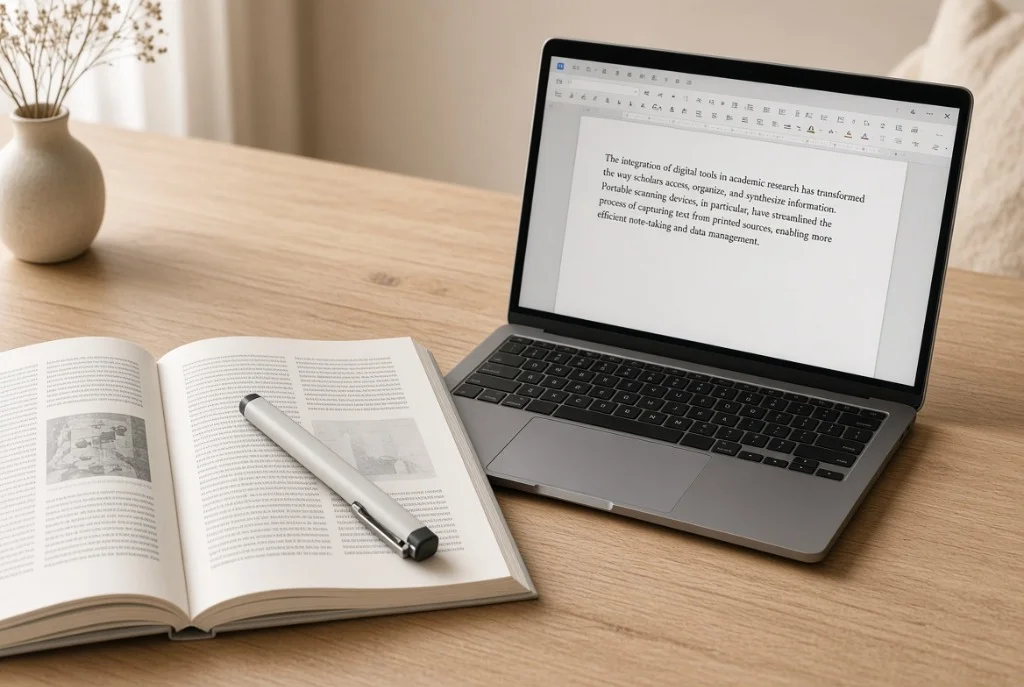
An OCR pen scanner for books is a precision handheld digitizing instrument specifically optimized to capture and transcribe lines of printed typography directly from bound volumes into digital text processors. Unlike traditional scanning hardware that captures entire two-dimensional pages, an OCR pen operates as a linear extraction tool: the researcher sweeps the stylus across a specific sentence, and the onboard optical character recognition engine instantly converts the printed ink into digital Unicode text.
Digitizing bound books presents unique physical challenges that do not exist with loose office paperwork. Books have rigid spine bindings, three-dimensional curvature near the inner gutter, fragile paper stocks, and delicate bindings that can crack under the physical pressure of a heavy flatbed scanner lid.
An OCR pen scanner completely bypasses book geometry constraints. Because the contact scanning head is only a fraction of an inch wide, it glides effortlessly across curved page margins, deep into the spine gutter, and over tight typography without exerting damaging mechanical pressure on the binding.
An OCR pen scanner for books is a handheld digital highlighter that types whatever printed sentence you swipe directly into your laptop, document, or citation manager. It lets you pull quotes out of thick, bound library books without breaking the spine or typing a single word by hand.
Book Digitization Methods Compared
Researchers and students choose between four primary hardware methodologies when extracting text from printed books.
| Digitization Method | Primary Strength | Spine Strain | Best Practical Use Case |
|---|---|---|---|
| Handheld OCR Pen Scanner | Instant line quote injection to word processor cursor | Zero (gentle glide along page) | Research notes, thesis literature reviews, legal citations |
| Overhead Book Scanner | Fast whole-page capture with laser curve-flattening | Low (book rests open in cradle) | Archiving entire 400-page out-of-print volumes |
| Flatbed Glass Scanner | High-resolution archival imaging (600–1200 DPI) | High (spine pressed flat against glass) | High-fidelity illustration and photo archiving |
| Smartphone Camera OCR Apps | Zero hardware cost using phone camera apps | Zero (held overhead distance) | Quick casual snapshots of single pages on the go |
- Primary Strength
- Instant line quote injection to word processor cursor
- Spine Strain
- Zero (gentle glide along page)
- Best Practical Use Case
- Research notes, thesis literature reviews, legal citations
- Primary Strength
- Fast whole-page capture with laser curve-flattening
- Spine Strain
- Low (book rests open in cradle)
- Best Practical Use Case
- Archiving entire 400-page out-of-print volumes
- Primary Strength
- High-resolution archival imaging (600–1200 DPI)
- Spine Strain
- High (spine pressed flat against glass)
- Best Practical Use Case
- High-fidelity illustration and photo archiving
- Primary Strength
- Zero hardware cost using phone camera apps
- Spine Strain
- Zero (held overhead distance)
- Best Practical Use Case
- Quick casual snapshots of single pages on the go
1. Handheld OCR Pen
2. Overhead Book Scanner
3. Flatbed Glass Scanner
4. Smartphone Camera App
The Problem It Solves: The Gutter Shadow and the Research Citation Bottleneck
For academics, attorneys, journalists, and students, writing a research paper involves a continuous cycle of reading books, identifying relevant quotes, and transcribing those excerpts into digital drafts.
Historically, this workflow was plagued by two major friction points: 1) Manual transcription is slow (averaging 35 words per minute) and introduces subtle typographic errors in names, dates, and technical citations. 2) Traditional scanners suffer from the "gutter shadow problem"—as a thick book approaches the bound center spine, the paper curves steeply away from the glass or lens. This curvature distorts character geometry and casts a dark shadow that renders traditional OCR software completely illiterate along the inner margin.
An OCR pen scanner neutralizes both problems simultaneously. The pen’s optical head is guided by human fingers directly into the curvature of the gutter, maintaining flat optical contact across the entire line. The captured text appears at your computer cursor at a rate of 1,000 words per minute—twenty times faster than touch typing.
How OCR Pen Scanners Interface with Word Processors
The elegance of modern book-scanning pens lies in their standard Human Interface Device (HID) protocol architecture.
User drags optical tip along book line; dual guide rails ensure parallel alignment.
High-contrast CMOS sensor captures letterforms; embedded OCR resolves characters to Unicode.
Pen transmits character codes over Bluetooth LE or USB as if typed on a physical keyboard.
Text appears instantly at the active blinking cursor in Word, Google Docs, or Zotero notes.
What It Is NOT: Surgical Quote Capture vs. Archival Page Archiving
Selecting the right scanning hardware requires understanding the distinction between extracting quotes and bulk document archiving.
| Task Objective | Optimal Hardware Tool | Time Required | Level of Human Effort |
|---|---|---|---|
| Extract 15 critical quotes from 3 library books for an essay | Handheld OCR Pen Scanner | 3 to 5 minutes | Extremely low (swipe exactly what you need) |
| Digitize an entire 350-page out-of-print historical volume | Overhead Cradle Scanner (CZUR / Fujitsu) | 12 to 18 minutes | Moderate (turn page, tap foot pedal) |
| Scan 5 pages of complex multi-column chemistry equations | Flatbed Scanner + Math OCR Software | 5 minutes | Moderate (align page, crop equations) |
| Capture an isolated paragraph while reading at a coffee shop | Handheld OCR Pen or Phone Camera OCR | 10 seconds | Minimal |
- Optimal Hardware Tool
- Handheld OCR Pen Scanner
- Time Required
- 3 to 5 minutes
- Level of Human Effort
- Extremely low (swipe exactly what you need)
- Optimal Hardware Tool
- Overhead Cradle Scanner (CZUR / Fujitsu)
- Time Required
- 12 to 18 minutes
- Level of Human Effort
- Moderate (turn page, tap foot pedal)
- Optimal Hardware Tool
- Flatbed Scanner + Math OCR Software
- Time Required
- 5 minutes
- Level of Human Effort
- Moderate (align page, crop equations)
- Optimal Hardware Tool
- Handheld OCR Pen or Phone Camera OCR
- Time Required
- 10 seconds
- Level of Human Effort
- Minimal
An OCR pen scanner is NOT designed to digitize a complete 400-page book from cover to cover. Sweeping a single line at a time across 400 pages would require thousands of physical hand swipes and cause severe repetitive wrist fatigue. If you need to digitize an entire book into an ebook or searchable PDF, use an overhead book scanner with foot-pedal triggering.
Technical Capabilities on Diverse Book Typography and Papers
Books are printed across hundreds of different paper stocks, typefaces, and ink densities. The matrix below outlines pen scanner performance across common publishing standards.
For dedicated guides on keyboard emulation, document scanning workflows, and text-to-screen integration, refer to Pen Scanning, and explore portable audio readers and standalone scanning pens on Scanner Reader.
| Book Publication Material | Print Quality & Typography | OCR Pen Success Rate | Operational Guidelines |
|---|---|---|---|
| Standard Hardcover / Trade Paperback | Clean matte paper, standard 10pt–12pt serif (Minion, Garamond, Caslon) | 99.4% Character Accuracy | Optimal performance; sweep smoothly at standard highlighting speed |
| Academic Textbooks (STEM & Law) | Dense two-column layouts, small 8pt–9pt footnotes, technical terminology | 98.2% Accuracy | Guide tip carefully along column boundaries to avoid reading across adjacent columns |
| Aged Archival Library Books (Pre-1950) | Yellowed rag paper, deckled edges, slightly uneven letterpress ink | 94.0%–96.5% Accuracy | Requires slower sweep speed; inspect vintage ligatures (such as "fi", "fl", "st") |
| Glossy Coffee Table / Art Books | High-gloss clay-coated paper, full-color saturated backgrounds | 85.0%–90.0% (Reduced) | LED reflection causes glare; tilt pen slightly to minimize direct specular reflection |
| Bibles & Legal Dictionaries | Ultra-thin translucent onion-skin paper (ghosting from reverse page) | 88.0%–92.0% (Mixed) | Backpage ghosting can create visual noise; slip a black sheet of paper behind page |
- Print Quality & Typography
- Clean matte paper, standard 10pt–12pt serif (Minion, Garamond, Caslon)
- OCR Pen Success Rate
- 99.4% Character Accuracy
- Operational Guidelines
- Optimal performance; sweep smoothly at standard highlighting speed
- Print Quality & Typography
- Dense two-column layouts, small 8pt–9pt footnotes, technical terminology
- OCR Pen Success Rate
- 98.2% Accuracy
- Operational Guidelines
- Guide tip carefully along column boundaries to avoid reading across adjacent columns
- Print Quality & Typography
- Yellowed rag paper, deckled edges, slightly uneven letterpress ink
- OCR Pen Success Rate
- 94.0%–96.5% Accuracy
- Operational Guidelines
- Requires slower sweep speed; inspect vintage ligatures (such as "fi", "fl", "st")
- Print Quality & Typography
- High-gloss clay-coated paper, full-color saturated backgrounds
- OCR Pen Success Rate
- 85.0%–90.0% (Reduced)
- Operational Guidelines
- LED reflection causes glare; tilt pen slightly to minimize direct specular reflection
- Print Quality & Typography
- Ultra-thin translucent onion-skin paper (ghosting from reverse page)
- OCR Pen Success Rate
- 88.0%–92.0% (Mixed)
- Operational Guidelines
- Backpage ghosting can create visual noise; slip a black sheet of paper behind page
Deep Dive: Handling Complex Page Layouts, Margins, and Footnotes
One of the greatest advantages of an OCR pen scanner over full-page automated camera scanning is human perceptual selectivity.
When full-page automated software scans an academic book page containing headers, two main text columns, callout sidebars, and three numbered footnotes, the software must guess the reading order. All too often, automated algorithms read straight across both columns, jumbling sentences together, or inject page headers ("CHAPTER 4: THERMODYNAMICS") right into the middle of a paragraph.
With an OCR pen scanner, your human brain performs the layout filtering while the pen performs the mechanical transcription. You place the optical tip exactly at the beginning of footnote 3, sweep across the two lines of text, and lift the pen. Your computer receives a clean, isolated citation without header junk, page numbers, or cross-column pollution.
History of Book Scanning: From Destructive Guillotines to Optical Styluses
The pursuit of digitizing books spans four distinct historical eras of physical and digital technology.
| Era | Dominant Book Digitization Methodology | Impact on Physical Books |
|---|---|---|
| 1. The Destructive Guillotine Era (1990s) | Spines were sliced off with industrial paper cutters; loose single sheets were fed through high-speed ADF sheetfed scanners. | 100% destructive; destroyed original physical books to achieve digital archives. |
| 2. The Flatbed Spine-Cracking Era (2000 – 2010) | Heavy commercial flatbeds; librarians manually forced bound books upside down onto glass plates. | Significant spine creasing, cracked glue bindings, and torn margin pages. |
| 3. The Tethered Optical Wand Era (2011 – 2018) | First generation USB/Bluetooth scanning pens (Scanmarker Air, IRISPen); typed directly into desktop word processors. | Completely non-destructive; liberated researchers from manual quote typing at library desks. |
| 4. The Cloud-Synced Smart Scanner Era (2019 – Present) | Wireless standalone pens, AI curve correction overhead cradles, automated reference extraction into Zotero and Obsidian. | Near-instant multi-device sync, markdown formatting support, non-invasive archival research. |
- Dominant Book Digitization Methodology
- Spines were sliced off with industrial paper cutters; loose single sheets were fed through high-speed ADF sheetfed scanners.
- Impact on Physical Books
- 100% destructive; destroyed original physical books to achieve digital archives.
- Dominant Book Digitization Methodology
- Heavy commercial flatbeds; librarians manually forced bound books upside down onto glass plates.
- Impact on Physical Books
- Significant spine creasing, cracked glue bindings, and torn margin pages.
- Dominant Book Digitization Methodology
- First generation USB/Bluetooth scanning pens (Scanmarker Air, IRISPen); typed directly into desktop word processors.
- Impact on Physical Books
- Completely non-destructive; liberated researchers from manual quote typing at library desks.
- Dominant Book Digitization Methodology
- Wireless standalone pens, AI curve correction overhead cradles, automated reference extraction into Zotero and Obsidian.
- Impact on Physical Books
- Near-instant multi-device sync, markdown formatting support, non-invasive archival research.
Known Physical Constraints When Scanning Books
Be aware of these real-world constraints when deploying an OCR pen on bound literature:
- Extreme Spine Pinch: In paperback books under 150 pages with stiff thermal glue, opening the book wide enough to place the pen tip against the inner 5mm of margin may require holding the page open with your thumb.
- Mathematical Equations & Sheet Music: Pen scanner OCR is trained on alphanumeric scripts; it cannot decode complex nested mathematical fractions, matrix brackets, or musical notation.
- Underlined or Annotated Passages: If a previous reader drew heavy pencil or highlighter lines across the text, the dark line can merge with lowercase character descenders (e.g., "g", "y", "p") and trigger OCR errors.
- Multi-Line Automatic Wrap: Most pen software inserts an automatic space between successive sweeps, but you must configure your driver settings to ensure it does not insert unwanted hard paragraph breaks between lines of the same sentence.
Benefits vs. Tradeoffs for Researchers and Students
Evaluating the net impact of an OCR pen scanner on academic and professional productivity.
Academic & Professional Benefits
- ✓Accelerates thesis, legal, and paper drafting by 10x to 20x
- ✓Eliminates typographic errors in author names, dates, and technical terms
- ✓Completely protects rare, antique, or library book bindings from damage
- ✓Integrates seamlessly into any active text editor (Word, Docs, Scrivener)
- ✓Lightweight, silent, and permitted in strict university library reading rooms
Productivity Tradeoffs & Costs
- •Single-line capture is too slow for whole-chapter digitization
- •Requires keeping an active laptop or device nearby for tethered models
- •Struggles on heavily marked, annotated, or stained library copies
- •Initial hardware cost of $140 to $220
- •Requires maintaining a consistent 10-15 cm/sec hand sweep pace
OCR Pen vs. Manual Keyboard Typing for Literature Reviews
Consider the quantitative math of an academic literature review. A comprehensive dissertation or legal brief typically incorporates 200 to 400 direct excerpts from printed monographs, case law volumes, and journals.
An average researcher typing at 40 words per minute takes approximately 3 minutes to locate, read, type, and proofread a 60-word quote. Across 300 citations, manual transcription consumes 15 full hours of pure mechanical keyboard labor, not counting eye strain from shifting focus back and forth between book and screen.
With an OCR pen scanner, extracting a 60-word quote takes exactly two smooth sweeps totaling 8 seconds. Across 300 citations, total transcription time drops to under 45 minutes. The researcher preserves valuable cognitive energy for critical analysis rather than keyboard mechanics.
When to Use an OCR Pen on Books (Decision Matrix)
Use this checklist to determine whether a pen scanner fits your book research workflow.
| OPTIMAL CHOICE: OCR PEN SCANNER | CHOOSE OVERHEAD / FLATBED SCANNER INSTEAD |
|---|---|
| You are taking selective notes and capturing quotes for an essay or report | You need to convert an entire 300-page book into a searchable PDF archive |
| You are working in a university library with non-circulating reference books | The book contains extensive diagrams, photographs, and complex equations |
| You want text to flow directly into Word or Google Docs at your active cursor | You want full-page color facsimile reproductions for graphic design |
| You are quoting from delicate bindings that cannot be pressed flat on glass | You are processing loose-leaf unbound printed lecture notes |
| You need a silent, ultra-portable tool that fits into an everyday laptop bag | You have a dedicated desktop scanning workstation with automated foot-pedals |
- CHOOSE OVERHEAD / FLATBED SCANNER INSTEAD
- You need to convert an entire 300-page book into a searchable PDF archive
- CHOOSE OVERHEAD / FLATBED SCANNER INSTEAD
- The book contains extensive diagrams, photographs, and complex equations
- CHOOSE OVERHEAD / FLATBED SCANNER INSTEAD
- You want full-page color facsimile reproductions for graphic design
- CHOOSE OVERHEAD / FLATBED SCANNER INSTEAD
- You are processing loose-leaf unbound printed lecture notes
- CHOOSE OVERHEAD / FLATBED SCANNER INSTEAD
- You have a dedicated desktop scanning workstation with automated foot-pedals
The Mental Model: "The Physical Copy-Paste Tool"
On your computer, you highlight a sentence on a website, press Command-C, click into your document, and press Command-V. You never retype digital text by hand.
An OCR pen scanner is literally Command-C and Command-V for the physical world. Sweeping the pen over physical paper executes "Copy"; lifting the pen automatically executes "Paste" into your word processor.
Frequently Asked Questions
Practical questions answered regarding book scanning pens, software compatibility, and academic workflows.