
Defining assistive technology in this context
Assistive technology for dyslexia covers any tool that helps someone complete a literacy-related task — reading, writing, or both — without requiring them to fully rely on the decoding skills that dyslexia makes difficult. The International Dyslexia Association frames this in terms of access: whether a given tool is appropriate depends on the individual, the task at hand, and the environment, not on any one tool being the default best choice.
It is important to be precise about what this technology is for. It is not a treatment and does not cure or reverse dyslexia, which is a difference in how the brain processes written language, not a condition a device resolves. Assistive technology sits alongside evidence-based reading instruction — phonics, structured literacy, decoding practice — as a separate, complementary support.
Categories of assistive technology for dyslexia
These tools generally split into reading support and writing support, though some overlap. Reading tools help a person get information out of text; writing tools help them get their own ideas into text without being limited by spelling or handwriting difficulty.
| Tool | Supports | Best suited for |
|---|---|---|
| Text-to-speech software | Reading | Digital text: ebooks, PDFs, web pages |
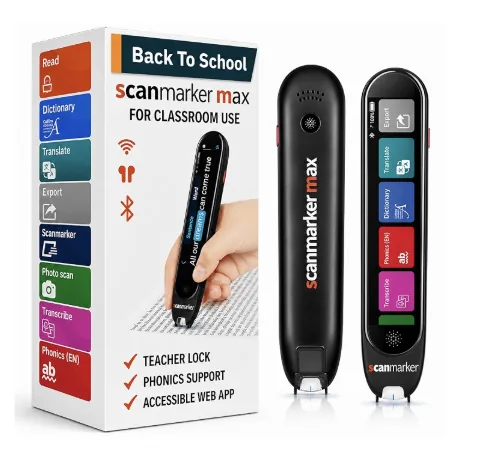
| Reading pens | Reading | Printed text: worksheets, books, forms |
| Audiobooks | Reading | Full-length texts, leisure and assigned reading |
| Screen readers | Reading | Navigating documents and software interfaces |
| Word prediction software | Writing | Composing text with spelling support |
| Speech-to-text / dictation | Writing | Getting ideas down without typing or spelling barriers |
- Supports
- Reading
- Best suited for
- Digital text: ebooks, PDFs, web pages
- Supports
- Reading
- Best suited for
- Printed text: worksheets, books, forms
- Supports
- Reading
- Best suited for
- Full-length texts, leisure and assigned reading
- Supports
- Reading
- Best suited for
- Navigating documents and software interfaces
- Supports
- Writing
- Best suited for
- Composing text with spelling support
- Supports
- Writing
- Best suited for
- Getting ideas down without typing or spelling barriers
Reading support tools
On the reading side, the choice mostly comes down to format: text-to-speech for anything digital, reading pens for anything printed, audiobooks for full-length works, and screen readers for navigating whole documents or interfaces rather than isolated passages. Many people use several of these depending on what they're reading and where.
Writing support tools
Dyslexia often affects spelling and written expression as well as reading, so writing-side tools matter just as much. Word prediction suggests likely words as someone types, reducing the burden of getting spelling exactly right before continuing a thought. Speech-to-text lets a person compose by speaking, sidestepping spelling and typing difficulty entirely to get ideas down.
Choosing appropriately, not universally
No tool here is a universal fix, and picking the "best" one in the abstract misses the point. A student might need a reading pen for a printed exam, text-to-speech for a digital reading assignment, and speech-to-text for a written essay — three different tools for three different tasks, all in the same day. The right match depends on what the task requires and what setting it happens in.
How this fits with reading instruction
Structured, phonics-based reading instruction remains the primary way decoding skills are built for someone with dyslexia; assistive technology does not replace it. Instead, assistive technology provides access to grade-level or work-level content in the meantime, so a person isn't excluded from tasks while instructional progress continues separately.